

From Zero to Production: Building a Modern AI Chatbot with Next.js & Elysia
Learn how I built a full-stack AI chatbot combining Next.js 16 with Elysia for a type-safe, ultra-fast backend architecture that scales.
Yosri Mlik
Software Engineer
Next.js is a fantastic React framework that pairs beautifully with robust backends like Spring Boot, ASP.NET Core, or Python when you're processing heavy data or complex business logic. For this project, I chose Elysia to keep the backend lightweight, type-safe, and blazing fast — without sacrificing the ability to scale or swap the frontend layer independently.
What I Built
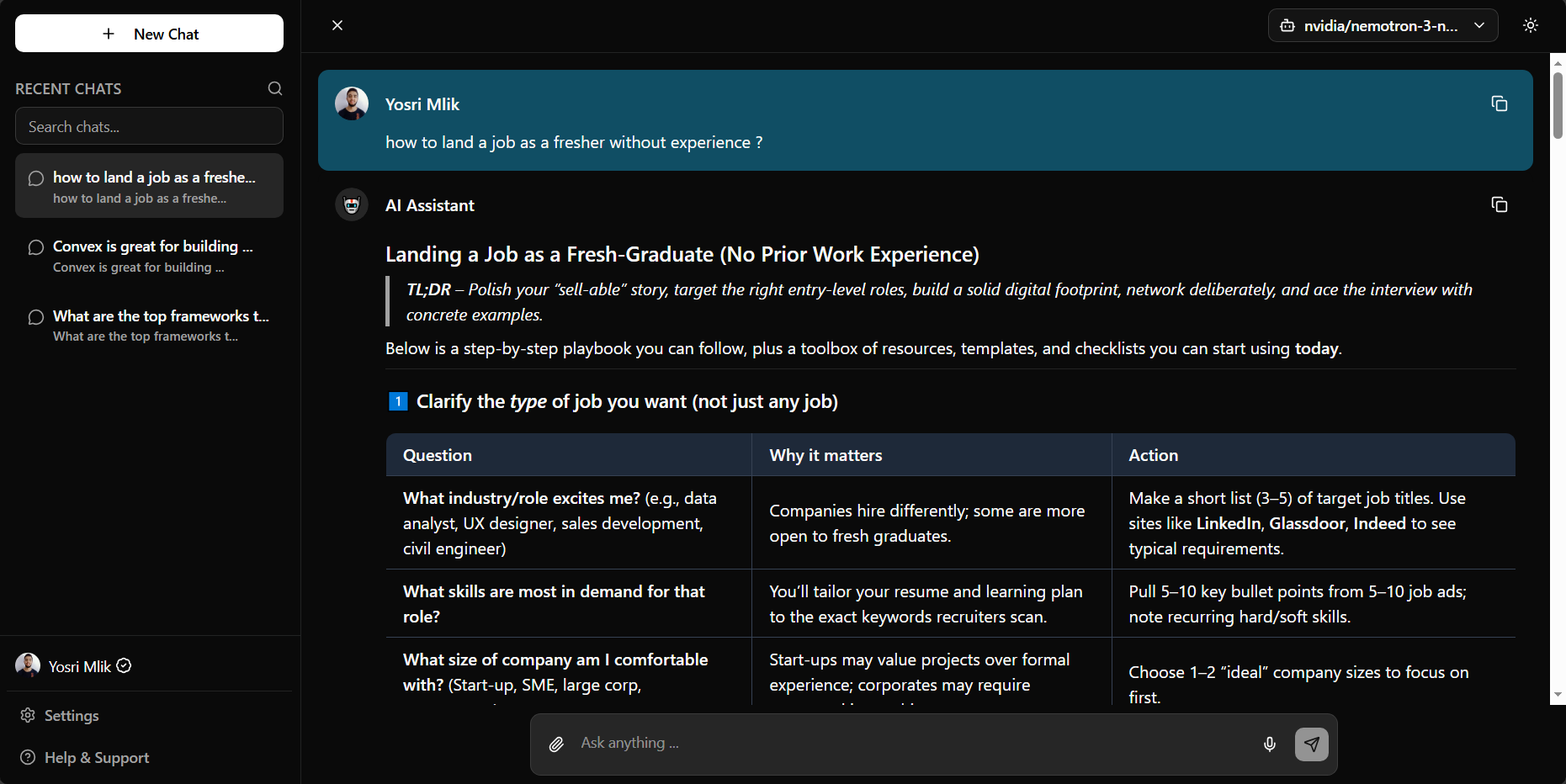
A full-stack AI chatbot that lets users interact with multiple AI models through a clean, responsive interface. Users can chat with different models, save conversation history, and manage chats seamlessly.
Live Demo: https://llm-wrapper-ymlik.vercel.app/
The Architecture: Next.js + Elysia Integration
This project explores a unique approach: running Elysia (an ultra-fast TypeScript framework) alongside Next.js instead of traditional Next.js API routes. Decoupling the backend ensures core business logic stays framework-agnostic, testable, and portable.
Why This Architecture Matters
- ⚡ Faster — Elysia's performance is unmatched, especially on Bun runtime
- 🔒 Type-safe APIs — End-to-end TypeScript safety with Eden Treaty
- 🎯 Clean separation — Backend logic independent of Next.js lifecycle
- 🔄 Reusable services — Business logic works in both API routes and Server Components without HTTP overhead
Clean Service/Controller Architecture
I implemented a Service/Controller pattern that keeps everything organized and reusable:
src/elysia/
├── models/                     # Domain models (business entities)
│   ├── ai-model.ts            # AI model domain types
│   └── chat.ts                # Chat domain types
├── services/                   # Business logic (reusable in server components)
│   ├── ai-models.service.ts   # AI models business logic
│   ├── chat.service.ts        # Chat business logic
│   └── openrouter.ts          # External API service
├── controllers/                # Routes + DTOs + Handlers (all-in-one)
│   ├── ai-models.controller.ts # AI models: DTOs + handlers + routes
│   ├── chat.controller.ts     # Chat: DTOs + handlers + routes
│   └── health.controller.ts   # Health: DTOs + handlers + routes
├── config/                     # Configuration
│   └── ai-models.ts           # AI models config & constants
├── app.ts                      # Main Elysia app composition
└── index.ts                    # Export services for server components
Layer Responsibilities
Models — Domain entities and business types
- Pure TypeScript interfaces
- Used by services and server components
- No API concerns
Services — Business logic (reusable everywhere)
- Core business operations
- Can be imported in server components
- Domain model focused
Controllers — Complete API feature (DTOs + Handlers + Routes)
- Request/response validation (DTOs)
- HTTP handling (handlers)
- Route definitions (Elysia routes)
- Single file per feature
Usage Examples
In API Routes:
// Automatic validation with DTOs
POST /api/chat → sendMessage handler → ChatService.sendMessage
In Server Components:
import { AiModelsService, ChatService } from '@/elysia'

export default function MyPage() {
  const models = AiModelsService.getAiModels() // Domain models
  const response = await ChatService.sendMessage({ message: "Hello" })
  return <div>...</div>
}
Key Technical Achievements
1️⃣ Enterprise-Grade Authentication
I implemented Better Auth with Google OAuth for secure user authentication:
- Custom session handling with cookie-based caching
- Macro-based route protection (authenticated: true)
- Handles both development and production cookie prefixes
- Seamless Google OAuth integration
2️⃣ Service/Controller Pattern Benefits
The architecture provides several key advantages:
- Simplified Structure: Everything for a feature in one controller file
- Reusable Services: Business logic works in API routes and server components
- Type Safety: DTOs for API validation, domain models for business logic
- Easy Navigation: Find all feature code in one place
- Scalable: Easy to add new features following the same pattern
3️⃣ Production-Ready Features
The application includes several production-ready features:
- Real-time AI responses with markdown rendering
- Chat history persistence per user
- Responsive mobile-first UI
- Optimistic UI updates for smooth UX
- Multiple AI model support through OpenRouter
Tech Stack
Frontend:
- Next.js 16 with App Router
- React 19
- TypeScript
- Tailwind CSS
- Radix UI (accessible components)
Backend:
- Elysia (ultra-fast TypeScript framework)
- Better Auth (authentication)
- Drizzle ORM (database)
Database:
- Neon PostgreSQL (serverless)
AI:
- OpenRouter API (multiple free-tier models)
API Endpoints
The application exposes three main endpoints:
-
GET /api/— Health check -
GET /api/ai-models— List available AI models -
POST /api/chat— Send chat messages
All models are free tier from OpenRouter, making it cost-effective to run.
The Journey
Coming from a traditional web development background, learning Next.js 16's App Router and combining it with Elysia was challenging but incredibly rewarding. The key insight: you don't always need to follow the traditional path — sometimes mixing the right tools creates something better.
Lessons Learned
- Architecture flexibility — Don't be afraid to mix frameworks if it serves your use case
- Type safety matters — End-to-end TypeScript prevents countless bugs
- Performance is achievable — Elysia + Bun provides incredible speed
- Clean separation — Decoupling backend from frontend makes both more maintainable
Future Improvements
- Add more AI models from different providers
- Implement file upload support for document analysis
- Add conversation export functionality
- Implement advanced conversation search
- Add collaborative features for team chats
Conclusion
Building this AI chatbot taught me that modern web development is about choosing the right tools for the job, not following dogma. The combination of Next.js for the frontend and Elysia for the backend created a performant, type-safe, and maintainable application that I'm proud to share.
Resources:
- Live Demo: https://llm-wrapper-ymlik.vercel.app/
- GitHub: https://github.com/YosriMlik/llm-wrapper