

The PC Power Timer: Babysitting Your Computer So You Don't Have To
Schedule your PC's power actions with ease — automatically shut down, restart, or put your computer to sleep after a set duration. Built with Wails (Go + React) for a lightweight Windows-native solution.
Yosri Mlik
Software Engineer
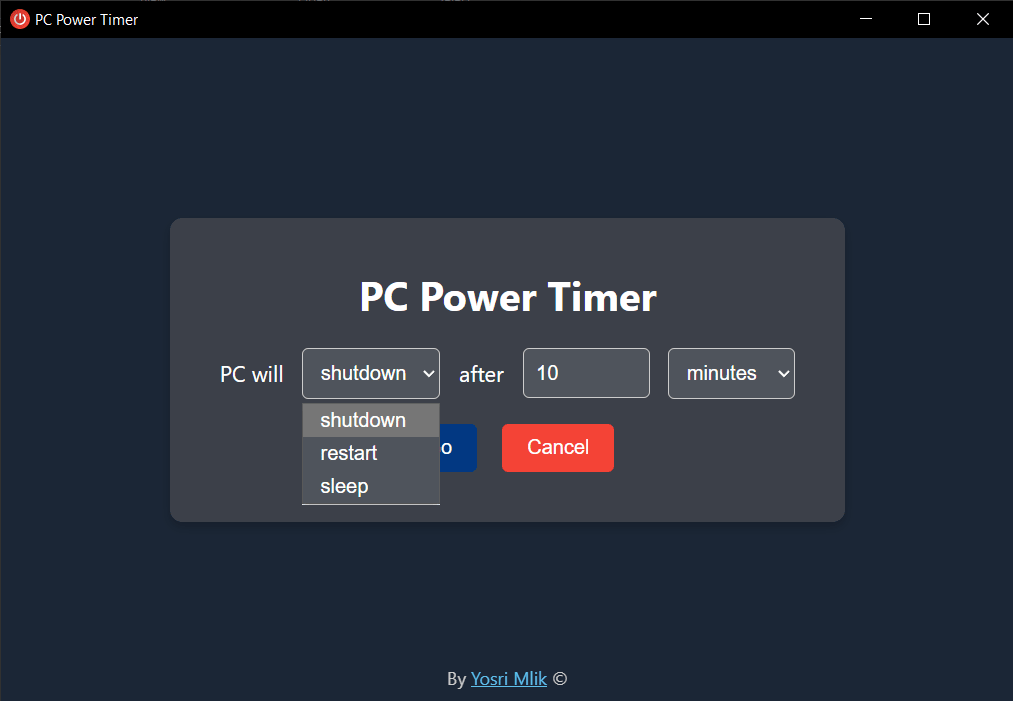
Have you ever fallen asleep watching a movie on your PC, only to wake up 8 hours later to your computer sounding like a jet engine? Fear no more! Meet the PC Power Timer.
Built with the mystical powers of Wails (which sounds like crying, but is actually an awesome Go + React framework), this neat little app does exactly what you'd expect: it puts your PC to sleep, restarts it, or shuts it down completely when the time is up.
Need your computer to shut down in exactly 45 minutes because you know you'll be passed out by then? Done! Want to force a restart because Windows is acting up and you need a dramatic pause? You got it! It uses highly sophisticated, definitely-not-Googled Windows commands (okay, it's literally `shutdown /s` and `rundll32.exe`) to execute its will upon your helpless machine.
So grab a snack, set the timer, and let PC Power Timer do the clicking while you take a hard-earned nap. Your electric bill will thank you!
Features
- Schedule Power Actions — Set timers for shutdown, restart, or sleep
- Flexible Time Units — Choose between seconds, minutes, or hours
- Easy Cancellation — Cancel any running timer with a single click
- Simple Interface — Clean and intuitive user interface
- Windows Native — Built specifically for Windows systems
The Tech Stack: Wails + Go + React
Why Wails?
Wails is a framework for building desktop applications using Go as the backend and web technologies for the frontend. It's similar to Electron but with some key advantages:
- Smaller bundle size — Go binaries are tiny compared to Electron's Chromium
- Better performance — Native Go code is faster than JavaScript for system operations
- Lower memory usage — No embedded browser engine overhead
- Cross-platform — Works on Windows, macOS, and Linux
Project Structure
The app follows Wails' standard architecture:
PC Power Timer/
├── app.go           # Main application logic and timer functions
├── main.go          # Wails application entry point
├── wails.json       # Wails project configuration
├── frontend/        # React frontend application
│   ├── src/         # Source files
│   └── dist/        # Built frontend files
└── build/           # Compiled executables
How It Works
The Go Backend
The Go backend handles the actual system commands. It uses Windows' built-in power management commands:
// Shutdown command
exec.Command("shutdown", "/s", "/t", "0").Run()

// Restart command
exec.Command("shutdown", "/r", "/t", "0").Run()

// Sleep command
exec.Command("rundll32.exe", "powrprof.dll,SetSuspendState", "0,1,0").Run()
The React Frontend
The React frontend provides a clean interface for setting timers and selecting actions:
- Timer input with flexible time units (seconds, minutes, hours)
- Action selector (Sleep, Restart, Shutdown)
- Start/Cancel buttons
- Countdown display
- Visual feedback for active timers
Communication Between Frontend and Backend
Wails automatically generates JavaScript bindings for Go functions, making communication seamless:
// Go function
func Shutdown() error {
    return exec.Command("shutdown", "/s", "/t", "0").Run()
}

// React usage
import { Shutdown } from '../wailsjs/go/main'

const handleShutdown = async () => {
    await Shutdown()
}
Development & Building
Prerequisites
- Go — Version 1.18 or higher
- Node.js — Version 16 or higher
- npm — Comes with Node.js
- Wails CLI — Install with `go install github.com/wailsapp/wails/v2/cmd/wails@latest`
Running in Development
To run the application in development mode with hot-reload:
wails devThis will:
- Start a Vite development server for the frontend
- Compile and run the Go backend
- Enable hot-reload for both frontend and backend changes
- Provide a dev server at http://localhost:34115 for browser testing
Building for Production
To build a redistributable production package:
wails buildThe built executable will be in the `build` directory.
Usage
- Launch the application
- Select the desired power action (Shutdown, Restart, or Sleep)
- Set the duration and time unit (seconds, minutes, or hours)
- Click "Start Timer" to begin
- Cancel the timer anytime if needed
Technical Details
- Backend — Go with Wails v2
- Frontend — React with Vite
- Platform — Windows
- Power Commands:
- Shutdown: `shutdown /s /t 0`
- Restart: `shutdown /r /t 0`
- Sleep: `rundll32.exe powrprof.dll,SetSuspendState 0,1,0`
Why This Matters
This project demonstrates several important concepts:
- Desktop development — Building native apps with web technologies
- System integration — Interacting with OS-level commands
- Go for backend — Using Go's strengths in system programming
- React for UI — Leveraging React's component model for desktop apps
- Cross-platform development — Writing code that works everywhere
Lessons Learned
- Wails is powerful — Great alternative to Electron for desktop apps
- Go excels at system tasks — Perfect for OS-level operations
- Simple problems deserve simple solutions — Sometimes a timer is all you need
- Hot-reload in desktop apps — Wails dev mode makes development fast and pleasant
Conclusion
The PC Power Timer is a simple but practical application that solves a real problem. It demonstrates how modern desktop development frameworks like Wails make it easy to build cross-platform applications that integrate deeply with the operating system.
Sometimes the best projects are the ones that solve your own problems. This app started because I kept waking up to my computer running all night after falling asleep watching movies. Now, I set the timer, grab a snack, and let PC Power Timer do the clicking while I take a hard-earned nap.
Your electric bill will thank you!
Resources:
- GitHub Repository: https://github.com/YosriMlik/pc-power-timer
- Download: GitHub Releases v1.0